Monday, 17 January 2022

Some of the Common Mistakes People Do When Their Hard Drive Crashes

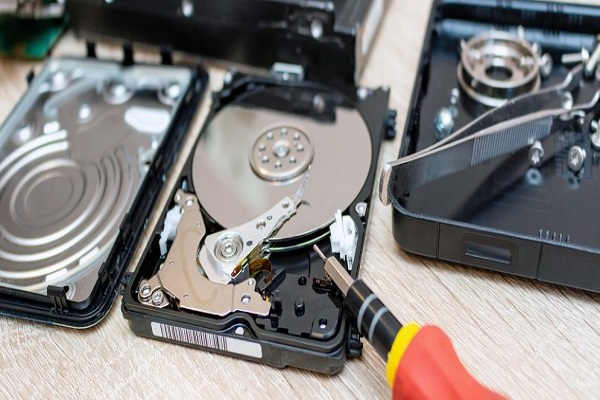
No matter how much you think that your hard drive is not going to crash, there is always a chance that it will happen. It does not matter what type of hard drive you have, there is always a possibility that it will have some issues. It is best to be prepared. You can have a backup so that you will have no problem with retrieving your data. What if you haven’t gotten around to updating your backup yet? The best thing to do is to contact Taking It Mobile data recovery.


Remember that the faster that you will get data recovery services in Toronto, the higher the chances that your data will be properly retrieved. It can be hard when something goes wrong but it does not mean that you should lose all of the data that you have stored for a long time.


Mistake #1: Not Having a Backup of the Files on the Hard Drive


This was already mentioned earlier. Most people do not think about having a backup because they cannot imagine that they would experience this issue. This happens more often than you think. You have assumed that your hard drive is safe but there are a lot of things that may happen that can make it stop working.

Mistake #2: Not updating your backup files often.

Some people have already made the mistake of not having backup data before. Now, they know that they have created a backup. There is just one problem – they do not usually remember to update their files. What is the point of having a backup when you do not update it regularly? You may still need to retrieve data that you have lost.

Mistake #3: Trying to do the recovery process on your own.


There are videos online that will teach you how to recover the data that you have lost. It may work for some people but there is no guarantee that it is going to work for you. Instead of trying to follow the video and not having all the right tools, you can just look for a company that does hard disk data recovery services Toronto. You can also ask for recommendations from people that you know. They will provide the services that you need correctly and efficiently.

Mistake #4: Deleting the disk partitions

Your hard drive may have disk partitions. They are there for a reason. They are available so that you can access your data easily anytime. What if you delete the disk partitions? You are going to make it hard to access the files that you have created. You have to make sure that you have already backed up all the files otherwise you will just lose all of the data that you are supposed to save.

Mistake #5: Following generic error messages

The error messages that you will get when you have some issues with your hard drive are going to be the same. There is no way of knowing what the actual problem is unless you ask a hard drive data recovery company Toronto.

If you are having issues with your hard drive, contact the right company soon. You can get the services that you need this way. Remember that reformatting your hard drive is not the answer. You will only end up losing all of your data that way.

For more information about data recovery services, do follow us on Google , Yelp and Ourbis .

Tuesday, 21 December 2021

5 Compelling Hard Drive Recovery Tips for Your Notebook

You will agree with me that portable devices are not foolproof. At some point in time, these devices just fail for some reason. When such devices fail, essential data is often lost. As a bigger section of the population is working remotely, the need for having tech-savvy employees keeps growing. This will ensure that your employees can safely recover the hard drives whenever they fail.


Before we dive right into the recovery tips, it is worth noting that data is not always lost whenever hard drives fail, but a specific part that points to the data in question. That is why the following recovery tips have proven helpful in solving the issue.

Read More Here

Wednesday, 15 December 2021

Impact of Coronavirus on the Data Recovery Industry: Is this Industry Foolproof?

Late 2019 marked the beginning of another pandemic that almost brought the world to a standstill. The coronavirus slowly joined the world consciousness, and soon, the pandemic claimed millions of lives, affected the school system, and caused a global economic turmoil no one ever anticipated.


Upon the World Health Organization declaration on March 11th as a global pandemic, the virus caused fears and anxiety, and no one knew what to expect next. Even though things are slowly getting back to normal, the impact of the pandemic is still fresh and intimidating in various parts of the globe. Most of the businesses are still closed, and the ones in operation are still nursing the shock from the pandemic.

Though the data recovery industry is somewhat resilient, this industry, too, faced a host of problems. Some businesses closed down, others laid off some staff, while others were able to navigate through the pandemic by inventing new ways of continuing with their operations. There was chaos in all the countries that reported the disease. But one thing for sure is, the magnitude of the effect is not equal among nations. Some countries have reported devastating impacts from the virus, while others have been less hit. The vaccine has helped curb the spread of the virus, and economies are gradually opening up. The problem, though, is that many people globally have not been fully vaccinated.

Saturday, 6 November 2021

How to Secure the Data on Your Hard Drive?

Your computer may be one of the most personal things that you have. You store a lot of private information there. All of the pictures that you have taken during your trip are there. All of the data regarding your work can be there too. Computers are reliable but the time may come when they may also fail. What are you going to do when this happens? You can contact Taking It Mobile hard drive data recovery.


You may think that you can try different things to revive your computer. This is not ideal. Just imagine if you would try the hacks that are available online. You may end up worsening the condition of your computer. Find a company that can offer data recovery services in Toronto. The faster that they can recover your data, the better.

Some Risks Involved


You can go to a professional and ask that your data be recovered. Things are not as easy as that. You need to remember that if you go to a company that is not too adept at recovering data, you may lose your data for good. Other things that may happen are the following:
  • Your secure data will be copied and shared with other people.
  • Your hard drive will not be used anymore.
  • You will lose all of the data that you have saved.

Just imagine if you would hire a technician who does not know what’s wrong with your computer. It will only make your situation worse.

What to Do to Secure Your Data


There are some things that you can do so that you can have more secure data:
  1. You need to make a daily backup of your files. This way, you know that even if your hard drive fails, there are other sources of important data.
  2. You may want to get a cloud where you can store all of your data. This will also be helpful if you need to access the data anywhere.
  3. You are going to have some files and folders that are more sensitive than the others. You can add a password so that people will not be able to access these folders easily. The extra layer of protection will help.

Hiring a Company to Do Data Recovery Service


It can be tempting to do everything on your own. There are videos that you can check online that will provide you with steps on how you can recover your data. There is no point in doing this especially if you do not want to lose the data on your computer. It is better to spend a bit on the services.

Remember that if the problem is related to the actual hard drive and not your software, there is no doubt that going to a data recovery company is going to be the only option. Feel free to check out Taking It Mobile right now. Contact them for all of your data recovery needs.

For more information about data recovery services, do follow us on Brownbook, 2findlocal, and Yalwa.

Saturday, 9 October 2021

Everything You Need to Know about SSDs

Solid-state disk drives (SSDs) are becoming more common in desktop and laptop computers. While SDDs serve the same purpose as hard disk drives (HDDs), there are some key differences in how they work.


How HDDs Work

To better understand how SSDs work, let’s first look at HDDs. HDDs have a range of spinning magnetic disks where data is saved, stored, and accessed. There is an actuator arm that moves over the spinning disks to read and write data. Since the arm must move into the right position over the spinning disks, it can take a little while before data can be saved or read from the drive.

Additionally, depending on the fragmentation of the data, the arm may need to move to different areas on a disk or different disks to save or retrieve data fully. The disks can also become corrupt and develop bad sectors where data can no longer be accessed or saved.

Read More Here

Monday, 27 September 2021

The Growing Industry of Data Recovery

Data is data until it’s gone.

With every computer comes data storage: data that can be deleted, stolen, or corrupted. Technology has historically acted in unpredictable and nerve-racking ways:


  • A virus could wipe out data.
  • An employee might choose to delete data for malicious reasons.
  • A natural disaster could destroy the computer containing your files.

This industry of data recovery is growing as more companies are relying on computers for their day-to-day operations.

Read More Here

Friday, 24 September 2021

How to Recover Data from a Broken Smartphone

People and businesses rely on smartphones more than computers these days. But what happens when things go wrong?


It happens to all of us at some point, no matter how careful we are with our smartphones. You might drop the phone and smash the screen. You may have gone “all thumbs” and watched as your phone tumbled into the toilet.

When things go wrong, there is some good news. There are ways to recover data from your broken Android or iPhone.

Read More Here

Tuesday, 21 September 2021

Physical Media Damage – Is Data Recoverable From My Hard Drive?

Physical media damage, a.k.a physical damages to hard drives that can make data unrecoverable, is something every computer user should know about and take precautions against (especially if your profession requires you to work with sensitive information).


Causes for damage may include anything from dropping your hard drive off the desk to having one withstand fire and then being put out with water which was then spilled on the hard drive by the sprinklers.

In this post, we will learn the basics of physical damages and what it means for the data on your hard drive.

What is Physical Media Damage?


The term physical media damage, or PMD, is used to differentiate from data corruption which can occur on media that physically is in good condition.

Read More Here


Thursday, 26 August 2021

Problems Accessing Data? Use Professional Data Recovery Services in Toronto

As proof of its commitment to protecting users from the disclosure of their private data and from other virtual crimes, Microsoft Corp. has filed criminal charges against fraudsters who electronically extract private user data worldwide. Taking It Mobile hard disk recovery will share more details about it.

Therefore, Microsoft also urges Internet users in our country to be wary of fraud aimed at identity theft. We appeal to Internet users in our country to be just as careful when doing business online or communication as they would be in the real world. Users can stop the disclosure of data by not responding to e-mails of suspicious origin and content, which ask for personal data.


Users should simply delete such mail. Preventing fraudsters from using the Internet as a tool for fraud is possible only if everyone cooperates. It therefore calls on citizens who use the Internet in their day-to-day communication or business to become more aware of this issue, noting that Microsoft provides all the necessary information and technologies that can protect them from this widespread unwanted and destructive threat.

To avoid scams of this kind, Internet users should take the following simple steps:

Suspect anyone who unexpectedly contacts you and asks for your personal information. It is difficult to establish the legality of a particular content or offer by simply browsing an email, a website, or making a phone call. But the sudden appearance of an unknown person asking you for personal information is usually a sign that something is wrong. Most legitimate companies and agencies do not do business that way.

Do not click on a link in an email asking for your personal information. It can take you to a fake website that looks just like the website of a real company or government agency. Following the instructions, you will enter your personal information on the website and hand it over to identity thieves. To check if the message was actually sent by a company or agency, call it or visit the company's website. If you do not have a phone number, look it up in the phone book, on the Internet or in the information service. Find the official website of the company or institution requesting your personal information through a search engine.

If you are approached by someone who claims to have been a victim of fraud, verify their identity before entrusting them with any personal information. Legitimate credit card issuers and other companies will contact you if an unusual spending pattern indicates that one of your accounts is being used by someone else. But they usually just ask if you’ve done certain transactions; will not ask for your account number or other personal information. If you are a victim of fraud, you will also be approached by the legislature. To be sure, ask the person contacting you for your name, agency or company name, phone number, and address. Then get the phone number of the company or institution from which the alert allegedly came (see advice above) and call to check the existence and authority of the person who contacted you. If you need any help with your data, contact Taking It Mobile hard disk recovery. Find us on BrownBook and SaleSpider

Thursday, 3 June 2021

How Can I Access Data on an Old Computer When I Forgot the Password?

There are various methods you can try to access data on an old computer when you have forgotten the password. If the operating system is Windows 10, it may be possible to reset the password if you remembered to create a password recovery DVD or USB app when you set up the computer.


If you did not, another option is to remove the hard drive from the computer. If the hard drive is not password protected, you can connect a SATA-to-USB cable to it and plug the USB into a different computer.

Once you boot up the computer, it will recognize the hard drive as a removable storage device. You should be able to navigate the drive and browse to find the data you want to recover, like pictures, videos, etc. Then, you simply copy those files to the hard drive on the computer you are using.

If you are tech-savvy, another option is to log into the administrator’s account on the old computer. For home users, most never change the default administrator’s password, which was left blank. You may need to boot the computer into safe mode to switch user accounts depending on the Windows version on the old computer.

Tuesday, 1 June 2021

Is it Worth It Investing in Saving Lost Data

How much is your data really worth? During these years, there were clients who came after a few years, sometimes more than 10, with an old disk that they carefully stored if they sometimes needed it. Sometimes data is invaluable!


Do you need a data rescue service? Taking It Mobile hard drive recovery is the right place for you.

Data is like books and that is why books are worth less today than before. The Internet has somewhat surpassed them. First the professional ones, then the encyclopedias, then the dictionaries and finally the fiction. Only ten years ago, favorite books should have been kept, not only for emotional reasons, because of our dear dedication or some third reason, but also because of a simple fact - where to find it if you want to read it again? An analogy follows - where to find a photo from a summer vacation that was captured on some media? If you don't have a physical copy, and there isn't one in the backup, the only option is a lab that provides a data rescue service?

We rescued one client's photos from mostly unreadable optical media and an external hard drive that failed after five or more years. And then we combined those from both media in whole. And we failed to save everything. Most yes, but some are lost forever. In some cases, the data can be reconstructed. From paper documents, by typing. The technique is thousands of years old! It is here that it is decided whether something will be reconstructed or saved. This is what most technicians experience while working with saving data.

The price is the one that usually decides, the less time it takes for the reconstruction to be done. It depends, of course, on the quantity. For those who follow the statistics, both those on data loss and those on rescue, there is a possibility to get a package that is there to prevent the loss or that, if it does occur, data recovery is convenient or even free in depending on the type of service. In the end, the most important thing is that data recovery is possible!

Manufacturers such as Western Digital have opted for affiliate programs with certain providers. The question is that at a time when it is possible to control cars from the other side of the world via a computer, why is it not possible to damage the disk remotely and is there any security measure or not? Or protection? Especially when one and the same company is responsible for both the device and the eventual recovery. On the one hand this seems convenient? Do I get a disk and some protection? but is it the same one who used the floods in Thailand to artificially raise prices?

The decision is up to you.No matter what you decide to go for, make sure that you get our contact information from Google and HotFrog.

Monday, 19 April 2021

4 Ways to Backup an Android Tablet or Phone


If you didn’t have a recent backup, you might not be able to recover your files, pictures, videos, and other data from your device. To avoid finding yourself in this situation, you need to be proactive and backup your Android device frequently using one of these different methods.

Backup Option #1: Google Photos.

Most Android devices can be linked to your Google account for cloud-based backups. Google offers the ability to backup your photos and videos to Google Photos. You can perform this backup by going into the settings for your device and selecting where you want to backup and sync your photos and videos.

Backup Option #2: Google Drive

For data files stored on your Android device, you can use Google Drive to perform a backup. You will need to download the Google Drive app if it is not already on your device. Simply open the app, tap the “+” sign in the lower right, and choose what files you want to upload.


Many people rely on their Android tablet or smartphone to perform a wide range of functions and for data storage. If you ever lost your tablet or phone, or it was accidentally damaged beyond repair, you know how devastating it can be to lose important data.

Tuesday, 13 April 2021

6 Common Mistakes People Make When a Hard Drive Crashes


Hard drive crashes and something that you must face could happen. Whether you have a conventional SATA drive or a newer solid-state drive (SSD), you must remember, your hard drive is a complex piece of equipment. Sooner or later, they can and do wear out and crash.


Unfortunately, people and businesses alike, tend to not plan accordingly. When their hard drive crashes, they go on to make other mistakes that could affect their ability to recover their data.

Mistake #1: Not having a backup of your hard drive.

The most common mistake made is never taking the time to back up your hard drive. Hard drives fail every day. It is better to be prepared by having a backup of your data just in case.

Monday, 12 April 2021

The Top 4 Current Internet Scams of 2021 to Watch Out For

Internet scams are constantly changing and evolving to attempt to trick people into giving out their personal information, financial account details, and even their money. Internet scams are huge business for scammers that easily cost people and businesses billions of dollars every year.


Top Scam #1: COVID-19 Scams

Anything related to COVID-19 and the global pandemic has become a new opportunity for scammers. They are taking steps to make their scams look like they came from a legitimate source in emails, text messages, and pop-up ads on websites. Some of the more common COVID-19 scams include:

  • Fake websites that feature face masks, disinfectant wipes, hand sanitizer, and other products in high demand.
  • Fake financial offers like ones to refinance your home, easy approvals for personal loans, and so on. Many of these scams look real and were sent by legitimate financial institutions.
  • Fake health organizations that are attempting to obtain your personal information by offering free COVID testing, vaccinations, and other such medical services.
  • Fake government agencies that claim to have details about stimulus payments, tax payments, and so on. The most important thing to remember is a government agency will never call, email, or text. They will notify you by mail when they have information to share that affects you directly.
  • Bogus nonprofit organizations that are seeking donations to provide financial relief, food, and medicine for those in need. If you want to donate to a nonprofit, do so directly, never through a link provided in an email or text message.


Tuesday, 6 April 2021

How to Protect Your Data Online


Any personal information that can be linked to you online enters your digital fingerprint. Your personal data that you leave on social networks - name, surname, place of residence, school you attend, your interests, photos and videos, comments you write below the content that others post. The digital footprint is your trace in the digital world. Unlike the real world, this trace is almost impossible to erase according to Taking It Mobile Toronto.


HOW TO PROTECT YOUR PRIVACY ON THE INTERNET?

When opening a profile on new social networks, it is not necessary to leave all the information, no matter what we are asked to do. There are those mandatory data such as name and surname, but also those that are not mandatory and that should never be left, such as phone number, residential address, school you attend.

I'm sure you've heard of the term "cookies". Cookies are small files that are located on the sites you visit, and they collect information about which articles you read, which content you search. Then when you return to that page one day, the content will be tailored to your interests. This is not so bad, because interesting content is available to you without much searching. However, this in a way violates your privacy, that is, the freedom to decide what you want. What’s good is that we can manage cookies ourselves. To prevent our data from being collected by a third party that may "invade" the page or site you're reading, you can find the "cookies" option in the privacy settings of Google Chrome or other browsers you use, and then block "third-party cookies" “.

In that way, you are actually preventing a page that you did not want to visit and that you are not interested in, from collecting further data about your activity,

PASSWORDS

A good password should be easy to remember, but not simple. It should be created from letters - smaller and larger, from numbers and signs. You should not share your password with anyone

ONCE ON THE INTERNET, FOREVER ON THE INTERNET

Before you post your photo or video on social media, think about who will watch it all - your parents, teachers, friends from school. Think before you send a photo or video to your friends. You never know if you will ever come into conflict, so that person will want to abuse you. Also, if your friends send you their content, do not violate their right to security and privacy.

KEEP YOUR PERSONAL INFORMATION LOCKED

The term "phishing" is important here, which is most often done via e-mail. It would literally mean "fishing people via email". This is done by certain people who are willing to abuse other people, sending emails that contain a link to a page that is actually fake. This page is used by those who "get caught" to leave their personal data, and in order to allegedly receive some prizes, they would get some discounts. Usually personal data, credit card, bank account are required. Find us on Google and 2FindLocal.

Monday, 1 March 2021

Why Does My Small Business Need Data Backups?


Hackers and the malicious apps they create are often targeted towards businesses more so than individuals. These threats pose serious risks for small business owners, who often have weak data security.


Reason #1: Protection from Hackers

Viruses, trojans, and ransomware can all pose problems for your small business and its day-to-day operations. What were you to do, if you were to turn on your computer and see a pop-up saying your computer had been taken hostage?

With regular data backups, you could wipe the computer and restore the data to get back to business as normal. Without one, you would be stuck either paying the ransom or potentially losing all your data.

Reason #2: Protection from Disasters

Another reason your small business needs to perform regular data backups is from physical disasters. A fire, broken water line, or another natural disaster could destroy your business and your computer equipment. Having a backup stored offsite ensures you can recover your data.

Wednesday, 20 January 2021

6 New Year’s Resolutions for Businesses


With the New Year just around the corner, now is a great time to start making a list of resolutions for your business. Your resolutions can include a wide range of goals and objectives you want to accomplish in 2021. Some of your resolutions can be carry-overs from 2020 since 2020 was an incredibly challenging year in part to the pandemic.


With all the excitement of the coming year, the COVID-19 vaccine, and hopes that 2021 will be the start of the return to ‘normal,” you don’t want to miss out on the opportunity to help your business potentially grow and become more successful. 

Resolution #1: Get into the habit of performing daily data backups. 

Your data is an essential part of your business. It is essential you have the most recent data available should you experience a server crash or workstation crash. You can backup data to the cloud or an external storage device.

Tuesday, 19 January 2021

How to Maximize the Life of Solid-State Drives


Solid-state drives (SSDs) are becoming more popular as storage devices in computers and other electronic devices. While SSDs have been around for several years, it is only in the past year or so that the price of this technology has started to decline and become more affordable. As such, more people are upgrading to SSDs.


SSDs provide several benefits over traditional hard disk drives (HDDs). For starters, there are no moving parts or components that could malfunction. The data is stored on special data chips, not a magnetic disc. As a result, SSDs are not prone to mechanical failure common with HDDs.

Another great benefit of SDDs is they are smaller and weigh less. This allows manufacturers to use SDDs in smaller devices and make them much lighter at the same time. Lastly, SDDs operate much faster when saving and retrieving data from the drive. This is due to how data is indexed onto the special data chips.


Thursday, 7 January 2021

What Will Happen When Your Hard Drive Crashes

Have you ever experienced losing all the data that you have stored for a long time? You may have lost your data because your hard drive crashed. Instead of trying to recover the data on your own, you need to find a hard disk recovery company Toronto. They will oversee trying to get the data. One thing that is for sure: they will have a better chance of extracting the data as compared to you. There are details about the right company to hire when you check Google Maps.


Why Did You Lose Your Hard Drive?

Losing your hard drive does not necessarily mean that you physically lost it or misplaced it. There is a chance that you have lost it because it has gotten wet and it does not want to turn on anymore. The hard drive may not be as durable as you have thought, and it has broken down. There are so many possible reasons why your hard drive is not working properly anymore. No matter what your reason is, now is not the time to ponder about what you should do. Just contact the right hard disk recovery company Toronto to provide the help and assistance that you need. Just remember that if they are unable to get the data the first time, it will be harder to get the data the next time that they try. There are details available in Hotfrog.


Identifying Physical Damage

How will you know if your hard drive is not functioning anymore? There are some signs that you need to look for:

  • Your computer has fallen to the ground and it does not want to start up correctly anymore.

  • Your computer is displaying error messages and may not be making any sense.

  • There is a clicking noise when you are trying to access the drive.

  • It may be a bit sluggish in trying to access files that it had no trouble accessing before.

  • The drive just remains silent when you are trying to access it.

If you experience any of the signs that are mentioned above, you already know that the only way that you can access everything is by making sure that you will hire the right data recovery company.


Will the Data Still be Recovered?

One thing that you should know: there is always no guarantee that you will be able to recover the data. There are various factors that may affect this. The faster that you try to recover the information, the higher the chances that you will still retrieve it. There are also different crash levels that may affect how recoverable your data is. The company that will do the data recovery in Toronto will give you the details that you need. They will also assess just how possible it is for the data to still be recovered.


What Should You Do?

If you have already realized that your hard drive is not working properly, try not to do anything that will worsen its condition. Some would say that you need to turn it off immediately to prevent further damage but remember that this is not true in all cases. Allow professionals to provide the hard disk recovery services Toronto that you need. This will increase your chances of getting your data back.


Wednesday, 23 December 2020

Top 8 Tips to Avoid Online Scams & Identity Theft

 Due to the coronavirus pandemic, more people are shopping online than before. While this is great for businesses, people could potentially be putting their identities at risk or be targeted for a fraudulent online scam. To help protect your personal information, as well as your devices, you need to take the right precautions by using these top tips.


If you receive text messages from unknown senders, avoid opening them. They could contain malicious code or links. If you reply to the text or click the link, your device could be infected with malware, ransomware, or allow a hacker access to your device.

Read More Here


Some of the Common Mistakes People Do When Their Hard Drive Crashes

No matter how much you think that your hard drive is not going to crash, there is always a chance that it will happen. It does not matter wh...